
What is new in Typeitin One version 4.1? Download
- Added button drag and drop to rearrange buttons.
- Added button copy and move to group menus.
- Added option to set the button data folder location.
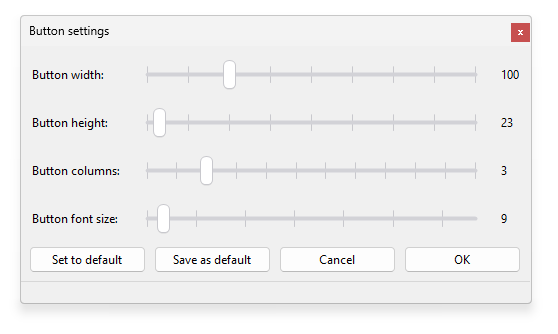
- Added button height, width, columns, and font size adjustment window.
 Added button window-watch match beginning, anywhere, end, or exactly options.
- Added group window-watch match beginning, anywhere, end, or exactly options.
- Updated set backup folder location dialog, added default on OneDrive.
- Text in the dialog function now accepts variables.
- Improved display speed of groups with very many buttons.
- Fixed issue with shortcut key not working after moving button to another group.
- Fixed issue where button or group window watch string could be all white-space characters.
- Fixed issue where group application watch string could be all white-space characters.
- Fixed issue with using Restore function with version 3.x data files.
- Fixed issue where some windows remained visible when computer was locked.
- Fixed issue with first button missing when number of columns was at maximum.
- Fixed issue with backup if computer was off/asleep at specified backup day/time.
What is new in Typeitin One version 4.0.3?
- Fixed issue with Restore and Version 3.x data files created by automatic backup.
- Added Sub GroupName, Sub Return, and Sub GroupName,ButtonName functions.
- Added support to import Version 3.x group (.tgf) files.
- Added Help option to titlebar menu.
- Added Group Import & Export to group menu.
What is new in Typeitin One version 4.0.2?
- Fixed issue with Typeitin Network & Enterprise license not always verifying correctly.
- Fixed issue with backup not saved to selected backup folder when running from removable drive.
What is new in Typeitin One version 4.0.1?
- Added password on start and password on pop up options in Settings to encrypt data file using user provided password.
- Fixed issue with Control T, W, F, B, or U causing a Windows error sound.
- Fixed issue with French azerty and German qwertz keyboards with Alternate Graphic modifier keys.
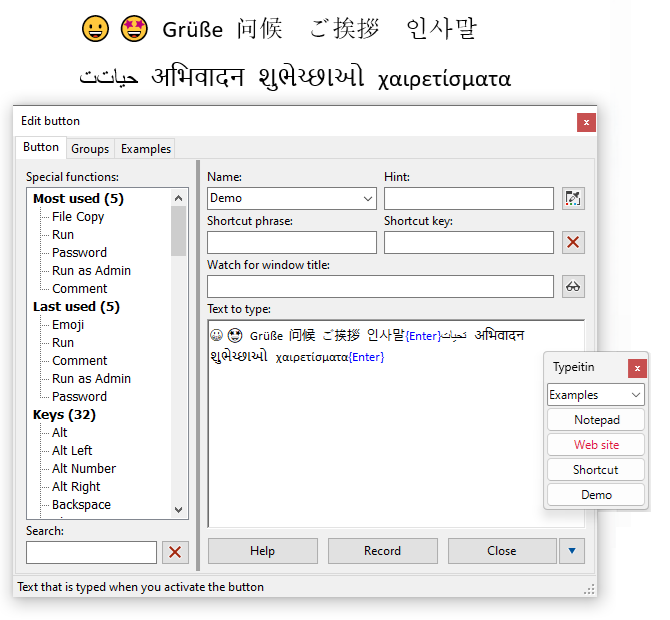
Typeitin One types your language—supporting characters from scripts around the globe.
Your existing Typeitin Network or Enterprise license with up-to-date maintenance is valid for Typeitin One. You can purchase a license for Typeitin One here or an upgrade from the Professional version here.
You can download the latest version of Typeitin One here.
You can import your Typeitin version 3.x buttons with the Restore option in Settings. For more information, please read the Help File.
If you have any questions, comments, or suggestions for Typeitin One, please visit the Contact page.